
Quickest ways to access Copilot
ameliahernandezo • March 10, 2026
Learn keyboard shortcuts to quickly access Copilot
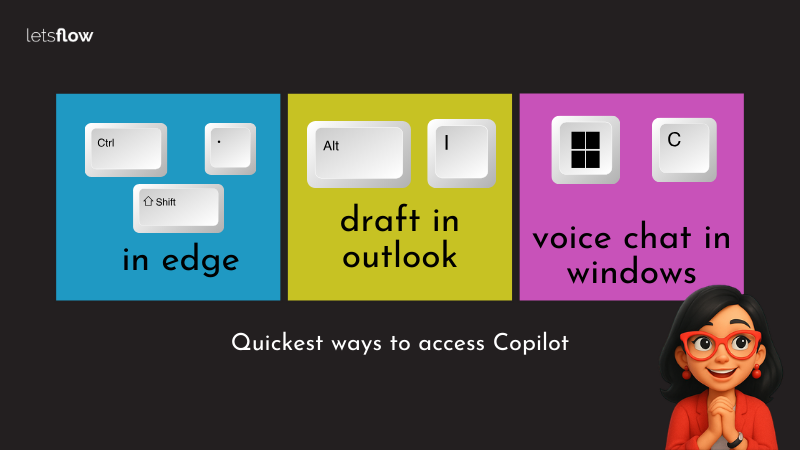
Here's a collection of keyboard shortcuts that will change your life with Copilot forver:
HOLD Win + C:
It will start a voice chat with Copilot, so you can speak your prompt instead of typing. It will save you lots of time.
PRESS Win + C:
It will start a Copilot chat to type your prompt.
PRESS Alt + I:
It will quickly take you to draft with Copilot in Outlook.
If you press it in Edge, it will start Rewrite with Copilot.
PRESS Ctrl + . + Shift:
It will quickly open Copilot sidebar in Edge

Der erste Arbeitstag nach dem Sommerurlaub: Dein Survival Guide mit Copilot.

One of my favourite Copilot use cases is not about productivity. It's about peace of mind.

Copilot Chat and Microsoft 365 Copilot differs in several aspects. Find out how?
Copilot Chat vs. Microsoft 365 Copilot: Wo liegt der Unterschied?

In 3 minutes or less, you will learn 3 tips to boost your Copilot habit.

About how to make Copilot your autopilot!

Get the latest Copilot innovations

In 3 minutes or less, you will learn how to:
1. Create Season's greetings with Copilot
2. Schedule an Advent calendar with Copilot
3. Create a prioritized task list of pending work before Christmas

About prompting strategies at a glance

How to get from A to B with Copilot